For commercial truck dealers

Every unit on the ground.
Every day it's been sitting.

ProInventory360 is inventory, flooring and lot-audit management for commercial truck stores. VIN-level records, physical audits that come due on their own, and factory invoices read in seconds, so no unit ages out of sight.

Tested against real factory invoices, not sample data.

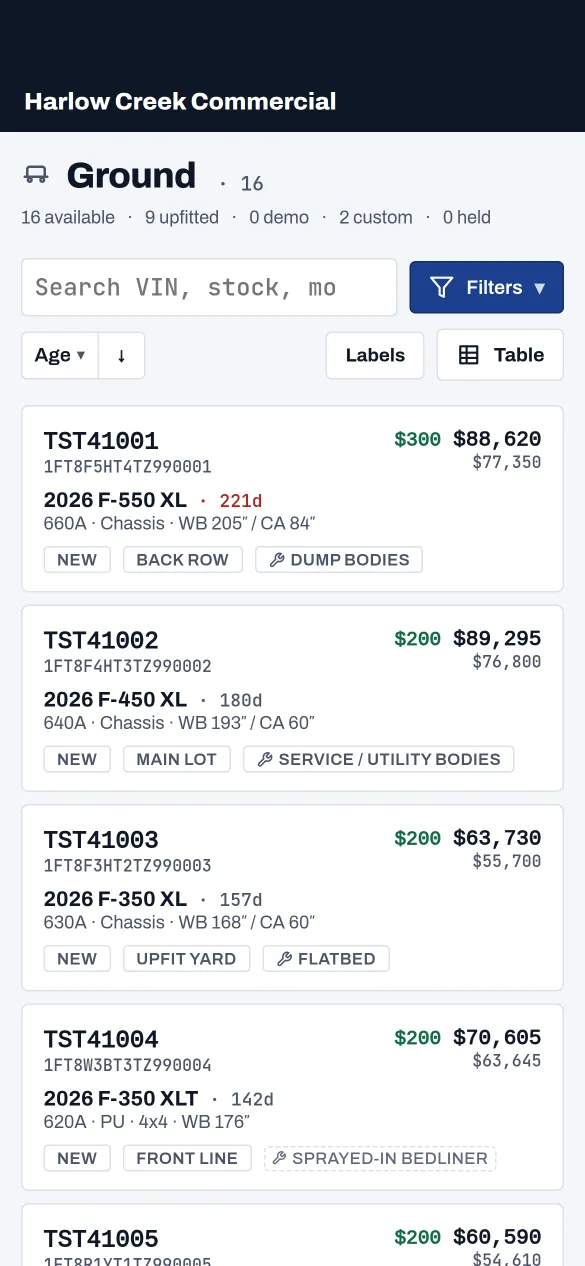
Ground

42 units Sorted by age
StockWBAgeMSRP
F-550 Super Duty · Chassis Cab XL 4×4
TC55-118 203″ 176dFlooring 4 days left $79,850
TC55-131 203″ 92d $81,400
F-250 Super Duty · Service Body XLT 4×4
TC25-204 176″ 61d $68,900
TC25-217 176″ 34d $71,250
Transit 350 HD · Cargo High Roof
TT35-090 148″ 22d $59,300
7 units past audit interval 3 past 180 days
VIN
Every unit is its own record, not a quantity in a bucket.
30 days
Default audit interval. Units come due on their own schedule.
180 days
ST999 flooring clock, counted per unit from the day it lands on your lot.
5 roles
From owner to lot tech, each sees exactly what their job needs.
The problem

Where the money leaks

None of this is exotic. It's the ordinary friction of running a commercial lot on a spreadsheet, a whiteboard and a group text.

The truck nobody can find

The sheet says Row C. The unit's been at the upfitter for three weeks. Nobody wrote it down, so a sold customer waits while three people walk the lot.

Flooring that runs out quietly

An ST999 order gets 180 days. Day 181 is a curtailment check nobody budgeted for, on a unit nobody realised was that old.

Audits that live on paper

The physical count happens on a clipboard once a quarter. Half the corrections never make it back into the system, so the next count starts from the same bad numbers.

Upfits booked away from the truck

Service body, toolboxes, liner, lighting. The invoices land in accounting, but the true cost of that unit never shows up next to it on the desk.

What it does

Built around the unit, not the deal

Everything hangs off the VIN: specs, location, keys, mileage, upfits, invoices, audits and the full history of who touched it.

VIN-level records

Stock number off the last eight. Model, trim, drivetrain, wheelbase, cab-to-axle, powertrain, body type, package code, keys 0–8, mileage and lot location, all on one screen. The units you opened at the desk are a tap away when you pull the app up on the lot.

Order to sold, one lifecycle

Separate views for Orders, Ground, Sold and Trades. Ground a whole batch at once when the truck of trucks shows up.

Audits on a schedule

Set the interval once. Units come due by themselves, a tech walks them on a phone, and anything that doesn't match routes to a manager for review instead of quietly overwriting the record.

Alerts that reach the phone

A unit sells or a task lands on a tech, and the right people get a push — even with the app closed. Tap it and you're standing on the unit or the task itself, not a list.

Tasks that find the tech

Assign a fix or a follow-up to one person or the whole crew. It reaches their phone and rides with the unit until it's marked done — separate from the audit walk-list, for the one-off that can't wait for the next round.

Invoices read for you

Drop in the factory invoice, the order invoice or an upfit bill — one at a time or a whole stack read as a batch. The record fills itself in and the document stays attached to the unit.

Upfits priced against the truck

Every bed liner, toolbox and service body carries its own cost and sell, marked paid or consignment, so real cost and real gross sit next to the unit.

Aging, flooring and spiffs

Aging counts from the factory invoice date or the day it hit your lot — your call. Flooring runs on the invoice date the lender's clock starts from, with a term for every order type and the ST999 window yours to set. Aging bonuses tier automatically and lock at the number they were worth the day the unit sold.

The working view

The screen your desk lives in

Pick the columns that matter, group by model line, read the whole lot at a glance. This is the vocabulary of a commercial truck store — not a generic grid bolted onto trucks.

GROUND · SHOWING 6 OF 42 · GROUPED BY MODEL LINE
The same inventory — desk and phone.
10 of 21 shown · custom
YearStockOrder #CodeTrim WBCASalesmanCompanyAge
F-550 · 3
84″ · 2
2026TC55-118J8814PW3DXL 203″84″H 4dR. AlvarezCedar Line Utility176d
2026TC55-131J8820PW3DXL 203″84″M. BooneNorthgate Rentals92d
60″ · 1
2025TC55-140J8899PW3DXL 201″60″QD. FreiValley Grade & Haul47d
F-250 · 2
XLT+ · 2
2026TC25-204J9102PX2AXLT 176″60″K. SantosPike Electric Co.61d
2026TC25-217J9140PX2AXLT 176″60″CJ. PooleRidgeway Fleet34d
Transit · 1
XL · 1
2026TT35-090K2210PY7CXL 148″22d
TC55-118
1FDUF5HT4TEA10118
$84,320
2026 F-550 XL · 176d
W3D · Chassis · 6.7L · 4x4 · WB 203″ / CA 84″
NewFront LineHold · Cedar Line Utility · 4d left
TC55-131
1FDUF5HT9TEA10131
$82,140
2026 F-550 XL · 92d
W3D · Chassis · 6.7L · 4x4 · WB 203″ / CA 84″
NewBack LotM. Boone · Northgate Rentals
TC25-204
1FT7W2BT5TEA10204
$67,200
2026 F-250 XLT · 61d
X2A · Pickup · 6.7L · 4x4 · WB 176″ / CA 60″
NewFront LineK. Santos · Pike Electric Co.
TC55-140
1FDUF5GT2TEA10140
$79,450
2025 F-550 XL · 47d
W3D · Chassis · 6.7L · 4x4 · WB 201″ / CA 60″
NewWash BayQuote Sent · 3d left
TC25-217
1FT7W2BT2TEA10217
$68,900
2026 F-250 XLT · 34d
X2A · Pickup · 6.7L · 4x4 · WB 176″ / CA 60″
NewServiceCustom · Ridgeway Fleet · J. Poole
TT35-090
1FTBW2CM8TEA10090
$54,300
2026 Transit XL · 22d
Y7C · Cargo Van · 3.5L · RWD · WB 148″
NewFront Line
How it works

One record, five stops

The unit's whole life, in the order it actually happens. Every stop writes to a history that can't be edited after the fact.

Order placed

Order number and type: Stock, Custom, ST999, Pool or B4A. Custom and B4A builds carry the customer and the rep from day one.

VIN received

Ford assigns the VIN, the stock number falls out of the last eight, and the order invoice attaches to the record.

On the ground

Ground it, place it in a row, count the keys, read the odometer. The age and flooring clocks are already running.

Audited

Every 30 days by default. Location, keys, mileage and upfits confirmed on the lot. Anything off goes to a manager to approve.

Sold

Buyer, rep, date and type. The aging spiff locks at the number it was worth that day and stops moving.

Invoice scanning

Stop keying in invoices

Upload the factory invoice as it came from Ford. Specs, dates and money come back filled in, including the invoice date the whole aging clock depends on.

Factory invoice · PDFUploaded
FACTORY INVOICE DEALER 00000 F5H F-550 CHASSIS CAB 4X4 XL VIN 1FDUF5HT0TDC80517 ORDER TYPE 5 ORDER NO K74B21 WB 169 CA 84 GVWR 19500 ENGINE 6.7L POWER STROKE V8 PKG 660A AXLE 4.88 TOTAL BASE & OPTIONS 68,412.00 HOLDBACK 1,368.00 TOTAL MSRP 76,995.00 INVOICE DATE 02/11/2026
Unit record · createdFilled from the invoice
VIN
1FDUF5HT0TDC80517
Stock
TDC80517
Model
F-550
Trim
XL
Drive
4x4
Body
Chassis
WB / CA
169″ / 84″
Powertrain
6.7L
Code
660A
Order no.
K74B21
Invoice
$68,412
MSRP
$76,995
Invoice date (age clock starts)
02-11-2026
Customers

One name. Every truck they've touched.

The unit is still the spine of the record. But the fleet buyer who asked about three chassis cabs in March is now a name you can pull up, with every quote, hold and sale filed under it.

Catch the duplicate before you make it.

Start typing “Cedar Line” and the match surfaces the Cedar Line you already have, before you create a duplicate. Misspelled, “LLC” or not, “Co.” or “Company.” It matches on the name underneath, not the way it was typed.

Customers and dealers, kept apart.

Retail buyers file under Customers. The dealerships you trade units to file under Dealers. One search, two lists, so a fleet buyer never surfaces when you're recording a trade.

Every quote, hold and sale files under the customer.

Quote a unit, hold it, sell it. Each one attaches to the buyer. Open the customer and their quotes, holds and sales are right there, every row one tap from the truck itself.

From the truck, back to the buyer.

Standing on a held or sold unit and need to know who's on it? “View customer” jumps straight there. And straight back.

The dedupe guard
Search customersDirectory
cedar
Cedar Line Utility Co.match
+ Create “cedar”

The fuzzy match catches the near-duplicate before it's created.

One customer, every record

Cedar Line Utility Co.

Customer
On hold
NEA55130 · F-550 XL Chassis
1FDUF5HT7NEA55130 · rep Delgado
3d left
Sale
EC41902 · F-350 XL
Jul 28 · rep Delgado
$72,600
Sold
Quotes
EB38471 · F-250 Service Body
Aug 4 · rep Delgado
$58,470
EA60218 · F-350 XL
Jul 22 · rep Delgado
$69,300
Who uses it

Five roles, five different screens

Everyone signs in to the same inventory and lands somewhere different. The lot tech gets a walk list, the sales rep gets units and customers, the manager gets the review queue. Set it up once and nobody scrolls past a screen that isn't their job — and an owner can preview any role to see exactly what that person sees.

Admin / Owner

Everything

Sets up the store, the lot locations, the audit interval, the aging tiers and who can do what.

General Manager

Everything but setup

Full inventory, cost, history and reporting across the store, without touching account-level settings.

Sales Manager

Day-to-day control

Reviews audit flags, applies corrections, unwinds a sale, sets demos, uploads invoices and upfits.

Sales

Sell & quote

Finds the right unit fast, quotes it, holds it, sells it, and leaves notes. Every quote, hold and sale files under the customer.

Lot Tech

Audits & tasks

Walks the lot on a phone and confirms what's actually there: location, keys, mileage and upfits.

Your data

Your lot is yours

Multi-store from the ground up, with the walls in the database rather than in the app code.

Store isolation

Every record is stamped with your store and filtered at the database layer. No other dealer can query your inventory, and neither can a bug in the interface.

History you can't rewrite

Every ground, move, audit, price change and sale is appended to a permanent log with who did it and when. Nothing is edited away.

Documents stay private

Factory invoices and upfit bills live in private storage under your store, reachable only through short-lived links.

Pricing

Priced by the size of your lot

One product, every feature, unlimited users. What you pay depends on how many units you're carrying. Nothing else. $209 for your first 30 units on the ground, then $90 for each additional 30.

200
30180330+
181–210 units
$749/mo
$3.75 per unit, per month
Request a walkthrough
Every band includes every feature: invoice scanning, audits, upfits, flooring clocks, all five roles, unlimited users.
Units on the groundPer rooftop / monthPer unit
1–30$209$6.97
31–60$299$4.98
61–90$389$4.32
91–120$479$3.99
121–150$569$3.79
151–180$659$3.66
181–210$749$3.57Most stores
211–240$839$3.50
241–270$929$3.44
271–300$1019$3.40
301+Let's talkGroups & multi-rooftop

Billed monthly per rooftop, cancel any time. Pay annually and two months are on us. Running several stores? We discount each additional rooftop. Tell us how many and we'll price it.

Get started

See it on your own lot

Tell us about the store and we'll walk you through it with your own inventory loaded. Not a canned demo.

  • 30-minute walkthrough, screen shared
  • We load a sample of your real units first
  • Nothing installed, nothing to sign

We'll reply within one business day. No mailing list, no reselling your inventory data.

Request received

We'll be in touch within one business day to set up the walkthrough. Check your inbox for a confirmation.